Introduction
Somewhere between the third failed integration and the fourth all-nighter during peak season, most supply chain leaders reach the same conclusion: the order management system that got you here won’t get you there. It was built for a world with fewer channels, slower customers, and simpler fulfilment promises. Today’s buyers expect BOPIS, ship-from-store, and same-day delivery as table stakes, and your OMS is the system that has to make all of it work in real time.
Order management system modernization is how you close that gap, deliberately, not in a panic during Black Friday. It’s not a single technology swap. It’s a set of connected decisions about architecture, cost, and people that determine whether your fulfillment engine becomes a growth advantage or stays a liability you manage around.
We’ve spent over a decade as an IBM Business Partner helping retailers, manufacturers, and distributors work through exactly this decision, and this blog lays out the full picture: what modernization actually means, how to know you need it, how to choose your path, what it costs, and how to bring your organization along with you.
What Is Order Management System Modernization?
Order management system modernization is the deliberate process of upgrading an OMS’s architecture, infrastructure, or capabilities so it can meet current and near-future business demands — as opposed to simply patching or extending a platform that’s reached the end of its useful design.
That distinction matters because “modernization” gets used loosely. A version upgrade that keeps the same architecture isn’t modernization. Neither is bolting on a new integration to work around a limitation the platform was never built to handle. Real modernization changes the system’s underlying capacity: how fast it processes orders, how many channels it can support natively, how it scales during demand spikes, and how easily it connects to the rest of your technology stack.
How Modernization Differs from a Routine Upgrade
A routine upgrade moves you to a newer version of the same platform without changing what the system can fundamentally do. Modernization changes the system’s capability ceiling — moving from a monolithic, on-premise deployment to a cloud-native or microservices-based architecture, for example, or consolidating multiple regional OMS instances into one unified platform.
What Does “Modern” Actually Mean for an OMS?
A modern OMS is cloud-deployed or cloud-ready, built on modular or microservices architecture rather than a single monolith, and exposes its functions through APIs so it can integrate with new sales channels, marketplaces, and fulfillment partners without custom rework. It also supports real-time inventory visibility across every node — store, warehouse, and in-transit — rather than batch updates that leave your promising logic guessing.
Why Order Management System Modernization Matters Right Now
The pressure to modernize isn’t theoretical — it’s showing up in the numbers. The multichannel order management software market is projected to grow from $4.52 billion in 2026 to $11.34 billion by 2034, a 12.2% compound annual growth rate, and cloud-based deployments already account for roughly 72% of that market. Buyers are voting with their budgets, and they’re voting for cloud-native, API-first platforms.
Meanwhile, McKinsey’s research on enterprise technology priorities found that 75% of top-performing companies have already shifted their technology spending toward capturing digital and business value, while roughly half of other organizations remain stuck funding infrastructure upkeep instead of growth. That gap compounds every quarter it’s left unaddressed.
What Happens If You Wait?
The cost of delay isn’t just missed opportunity — it’s active drag. Industry estimates put accumulated U.S. technical debt at roughly $1.52 trillion, and many enterprises report spending 60-80% of their IT budget maintaining legacy infrastructure rather than building on top of it. Nearly half of supply chain executives — 45%, per recent industry research — already call real-time inventory visibility a significant operational issue, and that number only grows as order volume and channel count increase.
We saw this firsthand with a large Indian fashion retailer running 3,000-plus stores, 40 warehouses, and integrations across ten-plus marketplaces. Their legacy OMS simply couldn’t keep pace with the business’s own growth. After moving to a containerized, auto-scalable architecture, they took inventory processing capacity from 25 lakh to 80 lakh-plus records per day, cut deployment time from 40 minutes to 10, and reached 99.99% uptime. That’s not a hypothetical upside — it’s what modernization unlocks when the underlying architecture stops being the bottleneck.
How Do You Know You Need OMS Modernization?
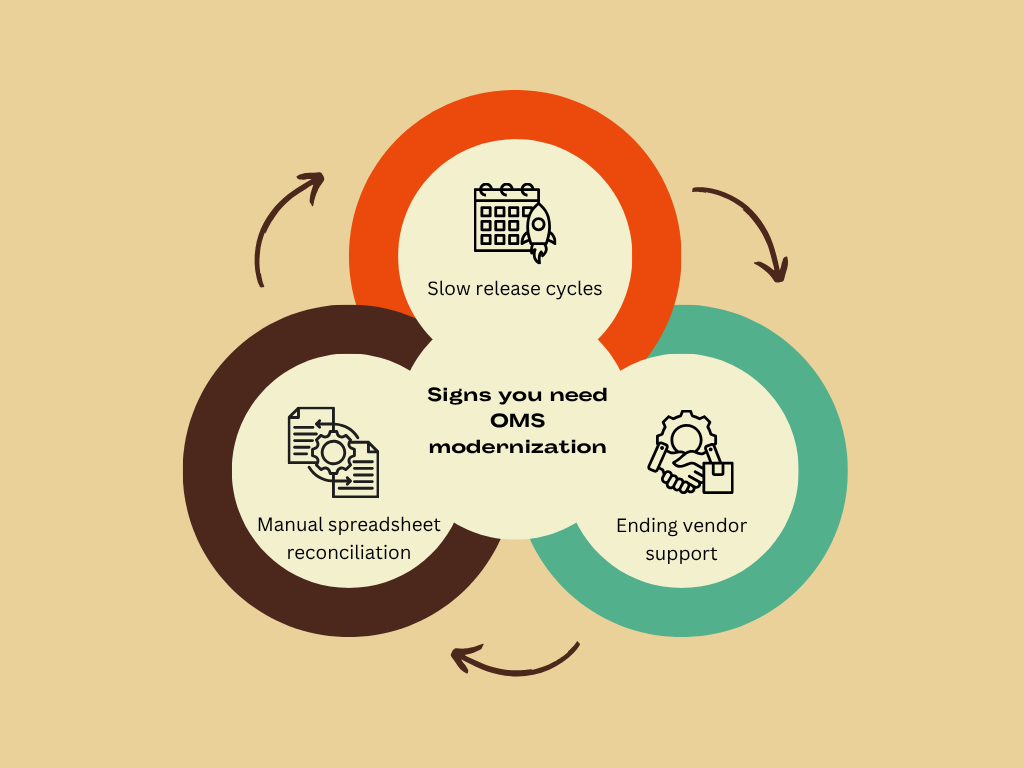
The signs are rarely one dramatic failure — they’re a pattern of workarounds that quietly become how your team operates. Manual spreadsheet reconciliation to cover integration gaps, release cycles measured in months instead of weeks, and a vendor support lifecycle you can see the end of are all indicators worth taking seriously.
Choosing Your Modernization Path: Modernize, Replatform, or Replace
Once you’ve confirmed modernization is warranted, the next decision is strategic, not technical: do you extend and modernize your current OMS, replatform it to a cloud-native deployment of the same core system, or replace it entirely with a new vendor?
Each path carries different cost, risk, and timeline profiles, and the right answer depends on how much technical debt you’re carrying, whether your current platform is still under active vendor support, and how much organizational risk you can absorb during a transition.
What Architecture Should a Modern OMS Run On?
Modernization decisions eventually come down to architecture: cloud-native, hybrid, or on-premise, and whether your platform is built on a monolith or on composable, API-first microservices. This isn’t purely a technical question, but it directly determines how fast you can add a new marketplace, how resilient you are during peak season, and how much custom integration work every future change requires.
If you’re already running IBM Sterling OMS and evaluating a move to Order Management on Cloud specifically, our guide to migrating to OMoC without breaking peak season covers the execution details.
What Does OMS Modernization Cost — and What's the ROI?
Cost is usually where modernization conversations stall, particularly when the business case has to compete with other capital priorities. The good news: the numbers tend to favor moving. Legacy and mainframe modernization initiatives report ROI in the range of 288% to 362%, and 98% of organizations report a measurable benefit in at least one critical operational area post-modernization.
Managing the Change: People, Not Just Platforms
The technology is rarely what derails a modernization program. It’s the operational disruption; teams working around a system mid-transition, customer-facing staff caught off guard by new workflows, or a cutover that wasn’t communicated clearly enough to the people who have to live with it. Research from change management firm Prosci found that projects run with excellent change management are roughly seven times more likely to meet their objectives than those run with poor change management — 88% versus 13%.
Once your new platform is live, our guide to managed services and agentic AI for IBM Sterling OMS covers what ongoing support and optimization should look like.
Legacy OMS vs. Modern OMS: A Quick Comparison
| Capability | Legacy OMS | Modernized OMS |
|---|---|---|
|
Architecture |
Monolithic, on-premise |
Cloud-native or hybrid, modular/microservices |
|
Inventory visibility |
Batch updates, periodic sync |
Real-time, cross-network |
|
Integration model |
Custom point-to-point |
API-first, standardized |
|
Scalability during peak |
Manual capacity planning, risk of downtime |
Auto-scaling, built for demand spikes |
|
Release cycles |
Months per change |
Weeks or less |
|
Channel support |
Rigid, costly to extend |
Designed for rapid channel addition |
|
Typical uptime |
Variable, dependent on manual ops |
99.9%+ achievable with the right architecture |
Getting Order Management System Modernization Right
Order management system modernization isn’t a single project with a finish line — it’s a series of connected decisions: recognizing the signs, choosing the right strategic path, picking an architecture that fits your risk profile, building a business case that survives budget scrutiny, and bringing your people along with the change. Get all five right, and the payoff shows up where it matters — in uptime, in fulfillment accuracy, and in how fast you can say yes to the next channel or market.
At Acuver, we have spent more than a decade as an IBM Business Partner helping retail, manufacturing, and logistics organizations work through exactly this journey, from the first diagnostic conversation to the system running in production. If you’re weighing where to start, our order management consulting team is a good place to have that conversation — no pressure, just a clear-eyed look at where your current system stands and what modernizing it would actually take.
What’s driving your modernization conversation right now — is it a scaling problem, a vendor support deadline, or something else? Connect with our team of experts to understand what your business needs right now.