You trust your inventory data. But should you?
Most supply chain leaders assume their inventory numbers are accurate. After all, the system shows 450 units available. The warehouse confirmed a count last month. The OMS is integrated. What could go wrong?
Quite a lot, as it turns out. Dirty inventory data is one of the most common — and most expensive problems in supply chain operations. And it’s almost always invisible until something breaks.
What Is Data Quality in the Context of Inventory Systems?
Data quality refers to the accuracy, completeness, consistency, and timeliness of data across your inventory systems. In an inventory context, this includes:
- Accuracy: Does the system reflect what’s actually on the shelf?
- Completeness: Are all products, locations, and attributes captured?
- Consistency: Do the WMS, OMS, and ERP show the same stock levels?
- Timeliness: Is the data current, or are you working with yesterday’s numbers?
- Validity: Are values within expected ranges? Are units of measure standardized?
- Uniqueness: Are there duplicate records inflating apparent stock?
Poor quality in any of these dimensions creates problems downstream. Often in multiple systems simultaneously.
The Real-World Impact of Poor Inventory Data Quality
The consequences of bad inventory data are rarely isolated. They cascade.
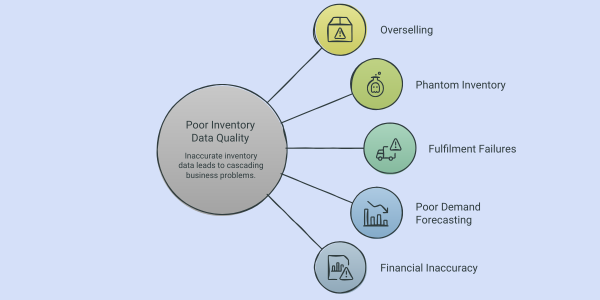
Overselling
The system says 50 units are available. In reality, there are 12 because 38 were damaged, returned incorrectly, or allocated to another order that wasn’t properly closed. A customer orders 20. The promise is broken before fulfilment even begins.
Phantom inventory
Stock that exists in the system but not in the warehouse. Common causes: unrecorded damage, theft, miscounts during physical inventory, failed system updates. Phantom inventory leads to false confidence and empty shelves at the worst possible moment.
Fulfilment failures
Orders are routed to fulfilment nodes based on inventory data. If that data is wrong, orders get stuck. Split shipments multiply. Carrier costs spike and customers wait.
Poor demand forecasting
Forecasting algorithms are only as good as the data they consume. Feed them dirty inventory data and you get inaccurate demand signals, which leads to overstocking some SKUs and running out of others.
Financial inaccuracy
Inventory is a balance sheet item. Inaccurate stock levels mean inaccurate asset valuations. In regulated industries, this has audit and compliance implications.
Data Quality Testing: What It Is and Why It's Different from Regular Testing
Most teams test functionality. Does the system accept an order? Does the WMS generate a pick task? Does the OMS update the customer?
Data quality testing asks a different set of questions. Not ‘does the system work?’ but ‘is the data the system produces trustworthy?’
It’s a fundamentally different discipline. And it requires a different testing strategy.
The five categories of data quality tests for inventory systems
- Completeness checks: Verify that every record contains all required fields. No SKU without a unit of measure. No location without a zone assignment. No order without a fulfilment node.
- Accuracy validation: Compare system records against a source of truth physical counts, supplier manifests, production records. Flag discrepancies beyond acceptable thresholds.
- Consistency checks: Confirm that the same data point shows the same value across all integrated systems. If the WMS shows 100 units and the OMS shows 85, something has broken and you need to know which system to trust.
- Timeliness testing: Measure how quickly data propagates across systems after a real-world event. A receipt scan should update inventory in near real time. If there’s a 4-hour lag, you’re operating on stale data.
- Referential integrity checks: Ensure relationships between data entities are valid. Every order line should reference a valid SKU. Every pick task should reference a valid location. Broken references cause silent failures.
Building a Data Quality Testing Framework for Inventory
- Define your data quality thresholds
Start by agreeing what ‘good enough’ looks like for each data domain. Inventory accuracy above 99%? Maximum tolerable lag of 15 minutes between a scan and a system update? Zero tolerance for orphaned records?
These thresholds become the basis for automated tests. Without them, you’re testing without a pass/fail criterion.
- Automate continuous data quality checks
Manual data audits are expensive, infrequent, and retrospective. By the time you find the problem, the damage is done.
Automated data quality checks run continuously, after every batch process, after every integration event, at defined intervals throughout the day. They catch anomalies in real time and alert the right people before problems compound.
- Use SQL-based validation queries: Scheduled queries that test data against defined rules and flag violations.
- Implement data quality dashboards: Visibility into key data quality metrics across all inventory systems, not just at audit time.
- Set up automated alerts: When data quality drops below threshold, the right team is notified immediately.
- Test integration points rigorously
Most data quality problems don’t originate within a single system. They happen at the boundaries, when data moves from the WMS to the OMS, from the ERP to the forecasting tool, from the carrier to the returns system.
Integration testing must include data quality assertions at every point of transfer:
- Does the receiving system get exactly what the sending system sent?
- Is data transformed correctly when formats differ?
- Are null values handled, or do they propagate as errors?
- Does the integration recover gracefully from partial failures?
- Run reconciliation tests regularly
Reconciliation is the discipline of comparing data across systems to find discrepancies. It should be automated and scheduled, not an occasional manual exercise.
- Daily OMS-WMS reconciliation: Compare available inventory figures across systems and flag discrepancies.
- Post-physical-count reconciliation: After cycle counts, automatically compare physical results against system records and trigger investigation workflows for variances.
- Carrier and returns reconciliation: Validate that, dispatched orders match carrier records, and returned items are correctly processed back into available stock.
- Conduct regression testing after system changes
Every system update, integration change, or configuration tweak is a potential data quality risk. Regression testing ensures that a change in one area hasn’t silently broken data quality in another.
Before any significant deployment, run a full suite of data quality tests across all affected systems. After deployment, run them again. Automate this as part of your CI/CD pipeline where possible.
The Organizational Side of Data Quality
Data quality is not just a technical problem. It’s a people and process problem.
- Assign data ownership: Every data domain should have an owner accountable for its quality. Inventory data has no natural owner in most organizations, and that gap is exactly where problems grow.
- Train warehouse teams: Most data quality issues in warehouses trace back to incorrect scanning, skipped steps, or workarounds that bypass the system. Training and process design matter as much as technology.
- Make data quality visible: Teams behave differently when they can see the impact of their actions on data quality metrics. Dashboards that show accuracy rates by team, shift, or location create accountability.
- Build a feedback loop: When downstream teams (fulfilment, finance, customer service) experience data quality issues, there should be a clear, fast path to report them and trigger investigation.
Where to Start
If data quality testing is not currently part of your inventory system governance, start here:
- Conduct a data quality audit across your WMS, OMS, and ERP. Measure accuracy, completeness, and consistency for your top 20% of SKUs.
- Identify the three most common data quality failure modes in your operation. Design targeted tests to catch each one.
- Automate at least one daily reconciliation check between your most critical systems.
- Assign a data quality owner for inventory data.
You don’t have to solve everything at once. But every step towards cleaner data makes your entire supply chain more reliable, more efficient, and more trustworthy.
Acuver's Approach to Quality Engineering in Inventory Systems
Data quality is not a one-time fix; it is an ongoing engineering discipline. At Acuver, our Quality Engineering practice is built around exactly this: ensuring that the data flowing across your WMS, OMS, ERP, and integration layers is accurate, consistent, and trustworthy at every point in the supply chain.
With over a decade of experience delivering for Fortune 500 companies and global retailers, we bring both the technical rigour and the operational context to design data quality frameworks that work in real environments, not just in theory.
Whether you are dealing with phantom inventory, integration failures, or reconciliation gaps, our team can help you identify the root cause, build the right testing architecture, and put continuous data quality governance in place.
Connect with our team of experts to ensure your inventory data quality is up to the mark.