Why "Type" Matters as Much as "Vendor" When Choosing an OMS
“Type” refers to the underlying structure of an OMS, not the brand name on it. It covers how the system is deployed, what business model it is built for, and how much scope it covers on its own. Two OMS products from two different vendors can look similar on the surface, yet behave very differently once they are running your daily order flow.
This matters because the type shapes what your business can and cannot do later. A system built for simple online orders may struggle with bulk B2B pricing. A tool designed for one warehouse may buckle when you add three more. Picking the right vendor solves a short-term need. Picking the right type protects your business for years to come.
For a comprehensive idea of an order management system, how it works, benefits etc, read our blog titled, What Is an Order Management System? The Complete Guide for Modern Businesses.
Types of OMS Based on Deployment
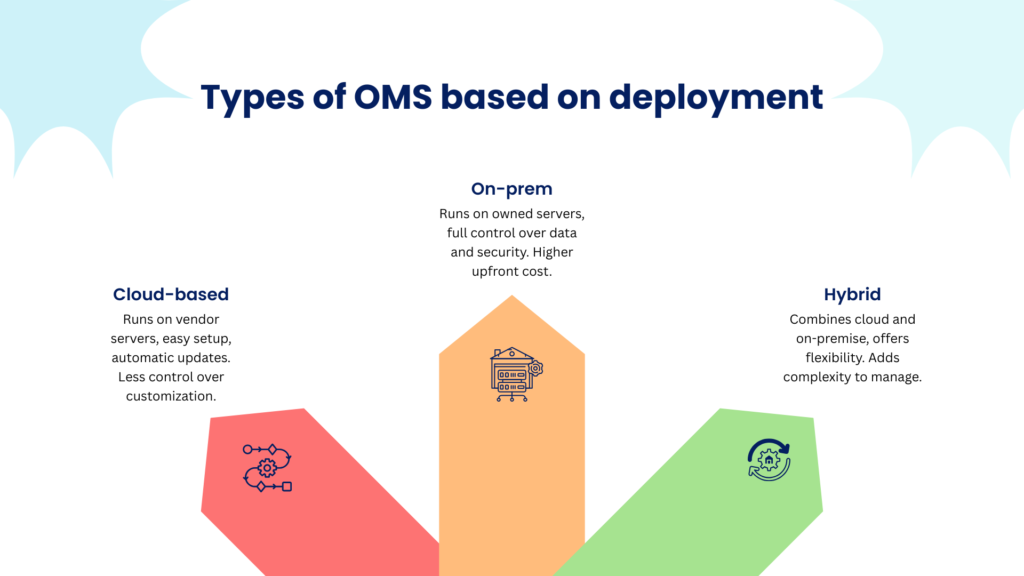
Cloud-based OMS platforms run on the vendor’s servers and are accessed through the internet. They are easy to set up, require little in-house IT support, and update automatically. The main downside is less control over customization and data storage location. This type suits growing businesses that want to move fast without building their own infrastructure.
On-premise OMS platforms run on servers your business owns and manages. They offer full control over data, security, and customization. The trade-off is a higher upfront cost and the need for dedicated IT staff to maintain the system. This type suits large enterprises with strict compliance needs or existing IT teams.
Hybrid OMS platforms combine both models, keeping some data or processes on-site while using the cloud for other functions. This gives businesses flexibility, but it also adds complexity to manage two environments at once. This type suits businesses that need tight control over certain data while still wanting the speed of cloud tools elsewhere.
Types of OMS Based on Business Model
B2C OMS platforms are built for direct-to-consumer sales. They prioritize fast checkout, real-time inventory updates, and quick fulfillment for individual orders. Features like personalized recommendations and simple returns matter most here. Many of these personalization and automation features are increasingly AI-driven. Read our blog, How AI Is Changing the Order Management Scene?, to see where the technology is headed.
B2B OMS platforms handle more complex needs. They support bulk orders, custom pricing tiers, negotiated contracts, and multiple approval steps before an order is finalized. These systems need to manage relationships with business accounts, not just individual shoppers.
Omnichannel OMS platforms unify orders across online stores, physical stores, and marketplaces. They give a single view of inventory and orders no matter where the sale happens. This type is ideal for businesses that sell through more than one channel and need everything to work together smoothly.
Types of OMS Based on Scope
Standalone OMS platforms focus only on order management. They tend to offer deep, specialized features but need to be integrated with other systems like ERP or eCommerce platforms.
OMS as a module within ERP means order management is built into a larger enterprise resource planning system. This keeps data unified across finance, inventory, and orders, but the order management features may be less advanced than a standalone tool.
OMS as a module within an eCommerce platform means order management is bundled with your online store software. This is convenient for smaller businesses but can limit flexibility as your needs grow.
Trade-offs of bundled vs. best-of-breed: Bundled systems are simpler to set up and manage since everything lives under one roof. Best-of-breed systems, where you pick the top standalone tool for each function, offer stronger individual features but require more work to integrate and maintain.
Side-by-Side Comparison Table
| Type | Cost | Complexity | Scalability | Control | Speed to Deploy |
|---|---|---|---|---|---|
|
Cloud-based |
Low upfront |
Low |
High |
Moderate |
Fast |
|
On-premise |
High upfront |
Low |
High |
High |
Slow |
|
Hybrid |
Moderate |
High |
High |
High |
Moderate |
|
Standalone |
Moderate |
Moderate |
High |
High |
Moderate |
|
ERP module |
High |
High |
Moderate |
Moderate |
Slow |
|
eCommerce module |
Low |
Low |
Low |
Low |
Fast |
Which Type of OMS Matches Your Business Profile?
The right OMS type depends on your order volume, number of sales channels, growth stage, and available IT resources. A business with high growth ambitions and limited IT staff usually fits a cloud-based, omnichannel-ready system. A business with heavy compliance needs and an established IT team may lean toward on-premise or hybrid.
Here are a few quick scenarios:
A DTC startup with a single online store and a small team, benefits most from a cloud-based, B2C-focused OMS that is quick to set up and does not require dedicated IT staff.
A mid-market omnichannel retailer selling online, in-store, and on marketplaces needs an omnichannel OMS that unifies inventory and orders across all channels in real time.
A B2B distributor managing bulk orders and custom contracts needs a system built for complex pricing and approval workflows, not a simple consumer-facing tool.
An enterprise with legacy ERP may benefit from an OMS module within their existing ERP system, keeping data unified without adding a separate platform to manage.
What Are the Questions to Ask Before Committing to an OMS Type?
The questions to ask before committing to an OMS type center on your resources, compliance needs, budget, and future growth plans. Answering these honestly helps avoid a costly switch later.
- Do we have the internal IT resources to manage and maintain this system, or do we need the vendor to handle that? If your team is small, a vendor-managed cloud system reduces the burden. If you have strong IT support, on-premise or hybrid options become more realistic.
- Are there data sovereignty or compliance requirements that dictate where our order data can be stored? Some industries and regions require data to stay within specific borders or under specific controls. This can rule out certain cloud providers or push you toward on-premise solutions.
- Are we better positioned for a large upfront investment or a predictable recurring expense? On-premise systems often need a big upfront spend, while cloud systems spread costs out as a subscription. Your cash flow and budget planning will point you toward one or the other.
- How many channels, warehouses, and geographies are we planning to operate across in the next two to three years? Your OMS needs to support not just where you are today, but where you are headed. Planning ahead avoids outgrowing your system too soon.
- Will this type still suit us if our order volume doubles, and how costly is it to switch if it does not? Growth can strain a system that was not built to scale. Understanding the cost and effort of switching later helps you make a safer choice now.
The Right OMS Type Sets the Stage for Long-Term Growth
Choosing the right OMS type is not just a technical decision. It shapes how easily your business can grow, add channels, and handle more orders without breaking existing processes. A system chosen for today’s needs alone can become a bottleneck tomorrow, so it pays to think a few years ahead. Once you have settled on a type, the next step is getting the rollout right. Read our blog, What Are the Best Practices to Implement an Order Management System?, to avoid common implementation pitfalls.
The right OMS type gives your business room to grow instead of holding it back. Deployment model, business model fit, and scope all play a role in how well the system serves you over time.
Acuver Consulting is a supply chain firm, specializing in order management, warehouse management and software engineering solutions. With more than a decade of expertise in OMS, Acuver helps businesses assess their current setup and future goals to recommend and implement the OMS type that fits best, so growth never gets stuck waiting on the wrong system.
Connect with Acuver’s team of experts for a tailored OMS solution.