What Happens Behind the Scenes Once an Order Is Placed?
An Order Management System, or OMS, works by capturing an order the moment it is placed and then guiding that order through every step until it reaches the customer. It checks payment, finds the right stock, sends the order to the right warehouse or store, tracks shipping, and manages returns if needed. In simple terms, an OMS is the control tower that makes sure an order moves smoothly from click to doorstep.
To understand it better, let’s look at what actually happens in those first few seconds.
The moment an order is placed, the OMS springs into action, even though the customer sees nothing but a simple order confirmation. Behind that screen, dozens of checks and decisions take place within seconds. The system verifies the order details, confirms that payment has gone through, checks that the item is in stock, and decides where the order should be fulfilled from. All of this happens automatically and instantly, which is why fast, accurate order processing feels effortless to shoppers, even though a great deal of work is happening behind the scenes.
For a broader understanding of what an OMS is and why it matters, read our blog, What Is an Order Management System: A Guide for Modern Businesses.
The Order Lifecycle, Step by Step
Order capture: The OMS collects order information from every channel a business sells on. This includes the website, marketplaces like Amazon or Flipkart, phone orders, and EDI orders from large retail partners. Every order, no matter where it comes from, lands in one central system.
Order validation: Next, the system checks if the payment is valid, screens the order for fraud, and confirms the shipping address is correct. This step protects the business from failed payments and reduces delivery issues later.
Inventory allocation and sourcing: Once validated, the OMS looks at available stock across warehouses, stores, and partners. It decides which location should fulfill the order based on stock levels, distance to the customer, and cost.
Order routing: The system then sends the order to the chosen fulfillment point. This could be a warehouse, a retail store, a third-party logistics provider, or a drop-ship vendor.
Picking, packing, and fulfillment triggers: At the fulfillment location, the OMS triggers picking and packing instructions. Staff or automated systems then prepare the order for shipment.
Shipping and carrier handoff: The order is handed off to a carrier such as FedEx, UPS, or a local courier. The OMS generates shipping labels and tracking numbers during this step.
Delivery confirmation and customer notification: As the package moves, the OMS keeps the customer updated with tracking alerts and finally confirms delivery.
Returns and reverse logistics: If the customer wants to return the item, the OMS manages that process too, from return authorization to restocking or refunding.
What Are the Key Components of an Order Management System?
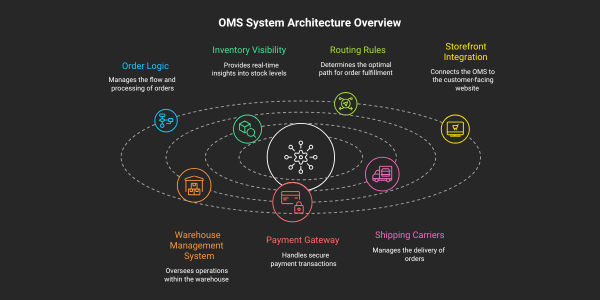
The system architecture behind an OMS is built around one core engine that connects to many other systems. The core engine handles order logic, inventory visibility, and routing rules. Around this core, the OMS connects to systems such as the storefront, warehouse management system, payment gateway, and shipping carriers. Each connected system handles its own specialized task, while the OMS ties everything together.
A key part of this architecture is the choice between real-time and batch processing. Batch processing updates information at set intervals, such as once every hour. Real-time processing updates information instantly. For modern commerce, real-time processing matters a great deal. Customers expect accurate stock counts and instant order updates. A delay of even a few minutes can lead to overselling or a poor customer experience.
How Does an OMS Talk to Other Systems?
An OMS talks to other systems through integrations that allow data to flow automatically in both directions. On the upstream side, it connects to storefronts, marketplaces, point-of-sale systems, and CRM tools to receive order and customer data. On the downstream side, it connects to warehouse management systems, carriers, payment gateways, and ERP systems to execute and complete the order.
These connections can be built in a few ways. Point-to-point integration connects two systems directly, which works for simple setups but becomes hard to manage as more systems get added. Middleware acts as a central hub that connects many systems together, reducing complexity. API-led integration uses standard, reusable connections that make it easier to add new systems over time. Most modern OMS platforms rely on API-led integration because it scales well as a business grows.
How Automation Fits into the Order Management System Space
Automation is at the heart of how a modern OMS operates. Rules-based order routing automatically sends orders to the best fulfillment location without manual input. Auto-allocation adjusts inventory in real time and can trigger alerts when stock falls below a set threshold. Automated systems also generate notifications for shipping updates, delays, or exceptions, and can flag issues that need human review.
Even with heavy automation, humans still play an important role. Simple, repetitive decisions are handled by the system, while complex or unusual situations are flagged for a human to review. This mix of automation and human oversight keeps operations fast without losing control.
To see how AI is taking automation even further, read our blog on how AI is transforming order management.
A Day in the Life: Walking Through a Single Order
Imagine a customer orders a pair of shoes online at 10 a.m. The OMS instantly checks payment and confirms it is valid. It then checks inventory and finds the shoes are available at a nearby store instead of a distant warehouse. The order is routed to that store. Store staff receive a pick and pack alert, prepare the package, and hand it to a courier by 2 p.m. The customer receives a shipping notification with tracking details. By the next evening, the shoes arrive at the customer’s door, and the OMS marks the order as delivered. If the customer later decides to return the shoes, the same system manages the return request and refund.
Common Myths About How OMS Works
Myth #1: An OMS is just an order tracking tool. In reality, an OMS does far more than tracking. It manages validation, inventory, routing, fulfillment, and returns.
Myth #2: An OMS replaces every other commerce system. An OMS works alongside systems like ERP and WMS. It does not replace them.
Myth #3: Inventory management and order management are the same thing. Inventory management focuses on stock levels. Order management focuses on the full order journey. They work together but serve different purposes.
Myth #4: An OMS automatically fixes broken processes. An OMS supports good processes, but it cannot fix poor planning or unclear business rules on its own.
Myth #5: OMS is only for large enterprises. Businesses of many sizes use OMS platforms today, especially as order volumes and sales channels grow.
Optimizing Order Operations with an OMS
A well-implemented OMS helps businesses reduce errors, speed up fulfillment, and keep customers informed at every step. It gives teams a single view of orders and inventory, which makes decision-making faster and more accurate. As order volumes grow or new sales channels get added, a strong OMS keeps operations steady instead of chaotic. The right starting point is choosing an OMS type that matches your business model. Read our blog, on the types of order management systems and how to choose the right one for your business, to explore your options.
An Order Management System plays a central role in modern commerce. It connects every step of the order journey, from the moment an order is placed to the moment it reaches the customer, and even through returns. Businesses that want to scale smoothly need an OMS that is reliable, connected, and built for growth.
Acuver Consulting is a supply chain consulting firm, specializing in order management, warehouse management and software engineering solutions. It helps businesses design and implement OMS solutions that fit their specific needs, so operations stay smooth even as the business scales.
Connect with our team of experts to transform your order management strategy.