What Is an Order Management System?
An order management system, or OMS, is software that tracks every order. It follows the order from the moment it is placed to the moment it is delivered. It gives a business one place to see orders, stock, and shipments. This works across all sales channels.
Order tracking started with manual ledgers. ERPs later took over this job and added inventory tracking. Today, cloud-based OMS platforms go further and connect stores, warehouses, and carriers in real time.
However, people often confuse themselves with the related terms such as ERP, WMS and a CRM. An OMS is not the same as an ERP, a WMS, or a CRM. An ERP manages a company’s money, a WMS manages a warehouse, and a CRM manages customer relationships. An OMS sits between these systems and focuses only on the order itself.
How Does an Order Management System Work?
An OMS works in a simple way. It captures an order the moment it is placed, checks stock right away, routes the order to the best location, and then tracks it until delivery. Each step happens on its own once the system is set up.
- Order capture, when a customer places an order
- Validation, when payment and details are confirmed
- Inventory check, when stock is verified across locations
- Routing, when the best warehouse or store is chosen
- Fulfillment, when the item is picked, packed, and shipped
- Tracking, when the customer gets delivery updates
- Returns, if the item comes back
An OMS connects to the storefront, the payment gateway, the warehouse, the carrier, and the ERP to keep every step in sync. Automation drives most of this work through rules-based routing, auto stock allocation, and quick customer alerts.
Read our blog on how an order management system works for a more comprehensive understanding.
What Are the Key Components of an Order Management System?
An OMS is built from several parts that work together. Each one plays a distinct role in keeping orders moving smoothly. Together, they give a business full visibility and control over every order it receives, no matter where that order came from.
- A centralized order dashboard that brings every order, from every channel, into one screen
- Multi-channel order aggregation that pulls in orders from online stores, EDI systems, phone calls, and marketplaces
- Real time inventory visibility that shows exact stock levels across every warehouse and store
- Order routing and fulfillment logic that decides the fastest and most cost-effective way to fill each order
- Returns and reverse logistics management that handles exchanges, refunds, and restocking
- Customer facing order tracking that lets buyers see exactly where their package is
- Reporting and analytics tools that reveal patterns in sales, delays, and errors over time
- APIs and third-party integrations that connect the OMS to carriers, marketplaces, and other business software
Which Features Should an OMS Have?
An ideal OMS should have the following features:
- Real-time inventory synchronization – Keeps stock counts accurate across all locations and sales channels, regardless of where a sale occurs.
- Flexible order routing – Directs orders through the shortest and most cost-effective fulfillment path to the customer.
- Omnichannel support – Integrates and manages orders from every sales channel a business uses.
- Automated returns management – Processes returns efficiently with minimal manual intervention.
- Actionable reporting and analytics – Provides clear, easy-to-understand reports that enable managers to make informed decisions quickly.
- Core OMS capabilities – These features are not optional add-ons; they form the foundation on which all other OMS benefits are built.
What Are the Benefits of an Order Management System?
An OMS brings a wide range of benefits, and most of them build on each other. Fewer errors lead to fewer returns. Fewer returns lead to lower costs. Lower costs and faster shipping together lead to happier, more loyal customers.
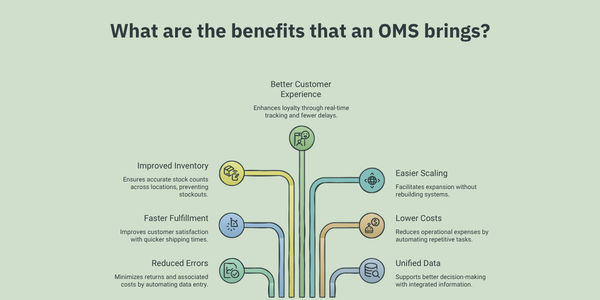
- Reduced order errors and manual data entry. The system pulls customer, payment, and stock details on its own, instead of relying on someone to type them in by hand.
- Faster fulfillment and shipping times. Orders are routed straight to whichever location can pack and ship them soonest.
- Improved inventory accuracy across locations. Every sale updates stock counts everywhere at once, so no location is left working from old numbers.
- A better customer experience. Real time tracking keeps customers informed and cuts down on the delays and surprises that lead to complaints.
- Easier scaling across channels and geographies. Adding a new sales channel or warehouse does not mean rebuilding how orders are handled from scratch.
- Lower operational costs through automation. Staff spend less time on repetitive tasks like manual order entry and status updates.
- Unified data for better decision making. Sales, inventory, and fulfillment information all live in one place, instead of scattered across separate spreadsheets and systems.
Taken together, these benefits change how a business operates day to day. Staff spend less time fixing mistakes and more time on work that actually grows the business. Customers get their orders faster and with fewer problems. This makes them more likely to buy again. Leaders get a clear, accurate picture of what is happening across the business. This makes it easier to plan ahead with confidence
Who Needs an Order Management System?
Any business that sells across more than one channel or from more than one location can benefit from an OMS. The exact reasons differ by business type.
- eCommerce and DTC brands often sell through their own website, a mobile app, and one or more marketplaces at the same time. They need an OMS to keep orders and stock aligned across all of them.
- B2B wholesalers and distributors deal with bulk orders, custom pricing, and complex rules for different customers. They need an OMS to keep these rules consistent and accurate.
- Omnichannel retailers sell in physical stores as well as online. They need an OMS to sync inventory between locations, so a sale in one place is reflected everywhere else instantly.
- Third party logistics providers manage fulfillment on behalf of several client businesses at once. They need an OMS to keep each client’s orders and inventory separate and organized.
- Manufacturers must coordinate production schedules with customer orders. They need an OMS to make sure what gets built matches what has actually been sold.
Each of these business types faces its own version of the same underlying problem. Orders come from more than one place, and stock needs to stay accurate everywhere at once. An OMS solves that problem regardless of the industry a business is in.
What Are the Different Types of Order Management Systems?
Order management systems differ in a few ways. They differ by deployment, business model, and scope. The right choice depends on a company’s size, budget, and needs.
By deployment, there are three types: cloud-based systems, which are easy to scale, on premise systems, which run on a company’s own servers, and hybrid systems, which mix both approaches.
By business model, there are three more types. B2B systems suit bulk orders, B2C systems suit retail customers, and omnichannel systems suit both at once. By scope, a business can pick a standalone OMS or one built inside a larger ERP or eCommerce platform. Small businesses often pick cloud based, standalone systems, while large firms often pick hybrid or module based systems.
For an in-depth insight, read our blog on the different types of OMS and how to choose the right one for your business.
What Are the Signs Your Business Needs an OMS?
A business usually starts to need an OMS when a few clear signs show up at once. Order volume climbs to the point where spreadsheets and manual checks start to break down. Orders begin arriving from more than one channel, making it hard to keep a single accurate view of stock. Manual processes start causing real problems. This might mean orders shipped from the wrong location, stock that shows as available when it is not, or customers left waiting for updates that never come.
A simple five step process helps a business work through this evaluation:
1. Define current order volume, the number of channels in use, and how complex the order rules already are.
- Map out integration needs, including how the OMS will connect to the ERP, the warehouse, the carriers, and any marketplaces.
- Separate must have features from nice to have features. This keeps the search from getting distracted by extras that will not matter for a while.
- Look closely at how well a vendor can support the business as it grows, not just where it stands today.
- Run a structured demo and a short pilot before committing. This way, the system is tested against real orders rather than a sales presentation
To explore these signs in detail, read our blog on the signs to know if your business needs an OMS.
How Do You Choose the Right Order Management System?
Choosing the right OMS starts with a simple match. The system should fit actual order volume and channel mix. From there, a business should ask vendors direct questions.
- How does the system handle peak season spikes?
- What integrations come included?
- How long does setup take?
- What support comes after launch?
How Much Does an Order Management System Cost?
An OMS cost varies by business size. Small businesses may pay a few hundred dollars a month. Large enterprises may pay tens of thousands a month. The price depends on order volume and features.
Pricing models vary too, including per order, per user, tiered SaaS plans, and one time license fees. Total cost also includes setup, staff training, and upkeep. Many vendors now offer modular OMS pricing, letting a business pay only for the parts it uses.
A few hidden costs deserve attention. These include data migration fees, extra integration charges, and costs tied to scaling up order volume later.
What Are the Best Practices for Implementing an Order Management System?
Successful OMS implementation depends less on the software itself and more on how well a business prepares for it. Good preparation, a phased rollout, and close attention after launch tend to separate implementations that go smoothly from ones that struggle.
Read our detailed blog on the best practices for OMS implementation for an in-depth understanding.
Before implementation begins, a business should focus on a few key steps.
- Audit existing data to find and fix problems before they get carried into the new system
- Map out the current order process in detail, so everyone understands exactly what is changing
- Get every relevant team aligned on the project’s goals before work starts, including sales, warehouse staff, and customer service
Implementation itself typically happens in phases, rather than all at once.
- Start with basic order capture and validation
- Add inventory sync once the core system is stable
- Layer in routing logic as order volume and complexity grow
- Add reporting tools as the team grows comfortable with the system
Once the system is live, a few key performance indicators show whether it is actually working as intended.
- Order accuracy rate, which shows how often orders are fulfilled correctly the first time
- Fulfillment cycle time, which shows how long it takes from order placement to shipment
- Return rate, which shows how often customers send items back
- Inventory accuracy, which shows how closely recorded stock levels match what is actually on the shelf
A few common pitfalls tend to derail these projects.
- Rushing the data migration step, which often leaves the new system full of the same errors as the old one
- Skipping staff training, which leads to workarounds that undo much of the automation the OMS was meant to provide
- Underestimating how long integrations take to configure properly, one of the most common reasons implementations run behind schedule
Careful planning around each of these areas goes a long way toward avoiding delays.
How Is AI Changing Order Management Systems?
AI is changing order management in a big way. It makes systems faster and smarter. It helps systems predict problems before they happen. This is a shift away from simple, reactive tools.
- AI powered demand forecasting for future stock needs
- Smart order routing that picks the fastest path on its own
- Anomaly detection that flags fraud or delays early
- Predictive returns management that spots patterns before they grow
- Plain language tools for quick order queries
The next step is the agentic OMS. Here, the system makes and adjusts decisions on its own. This moves the industry closer to fully automatic fulfillment. Learn more in our blog on how AI is changing order management to know more.
Enabling Growth for Modern Businesses with OMS
An OMS gives a business the view and control it needs to grow. It helps a business expand across channels without losing speed or accuracy. As order volume grows, an OMS turns into a core part of daily work, not just an extra tool.
Acuver Consulting is a leading supply chain consulting firm, specializing in order management, warehouse management and software engineering solutions. With in-dept expertise in order management across industries, Acuver can help put the right OMS in place, and support the full journey, not just the initial setup.
Connect with our team of experts to get tailored order management solutions that fit your business needs.