What Is an Order Management Software?
An Order management software is the layer that sits between your sales channels, your website, Amazon, Shopify, in-store POS and your warehouse or supplier. It takes an order in, checks it against inventory, routes it for fulfillment, updates the shipping status, and notifies the customer.
In short: OMS = Orders + Inventory + Fulfillment, unified into one system.
Without it, a small business is usually stitching this process together manually across a spreadsheet, a couple of marketplace dashboards, and an inbox which works until you add a second sales channel or your order volume climbs past what one person can track by hand.
Learn more about what an OMS is and what it can do for your business in our comprehensive guide.
The 6 Criteria That Matter When Comparing OMS Tools
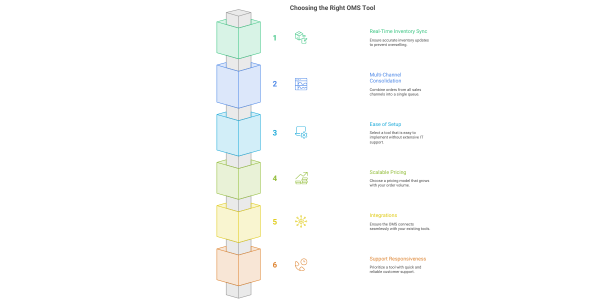
When comparing order management systems, small businesses should prioritize six things: real-time inventory sync, multi-channel order consolidation, ease of setup, pricing that scales with order volume, integration with existing tools, and support responsiveness.
- Real-Time Inventory Sync
If your inventory doesn’t update the instant an order comes in, you will oversell. This isn’t a nice-to-have feature, it’s the baseline requirement for any tool in this category.
- Multi-Channel Consolidation
A good OMS pulls every sales channel: website, marketplaces, retail, wholesale, into a single order queue, instead of forcing you to check five dashboards separately. If you’re only selling on one channel today, this matters less. The moment you add a second, it becomes essential.
- Ease of Setup
Small businesses rarely have a dedicated IT team. If onboarding a tool takes six weeks and a developer, it’s the wrong tool for your current stage regardless of how capable it is on paper.
- Pricing That Scales With Volume, Not Seats
Favor per-order or tiered-volume pricing over flat per-user licensing. Volume-based pricing tends to stay affordable as you grow and doesn’t penalize you for adding staff or seats.
- Integrations With What You Already Use
Your OMS should connect natively to your e-commerce platform, accounting software, and shipping carriers out of the box not through custom API work you have to commission separately.
- Support Responsiveness
When an order breaks at 6 p.m. on a Friday, you need a human to talk to, not a ticket queue with a three-day service-level agreement.
Checklist recap:
- Real-time inventory sync
- Multi-channel consolidation
- Ease of setup
- Volume-based pricing
- Native integrations
- Support responsiveness
Comparing the Options: 2026 OMS Categories for Small Business
| Category | Best For | Starting Cost Range | Setup Time | Watch-Out |
|---|---|---|---|---|
|
Built-in e-commerce OMS (e.g., Shopify’s native order tools) |
Single-channel sellers just starting out |
Included in platform plan |
Same day |
Weak once you add marketplaces |
|
Standalone lightweight OMS tools |
Multi-channel sellers, 1–3 staff |
~$50–$300/month |
1–3 days |
Feature ceiling as you scale |
|
Mid-market OMS platforms |
Growing businesses with 500+ orders/month |
~$300–$1,500/month |
1–3 weeks |
Can be overbuilt for very small teams |
|
Enterprise-grade OMS (e.g., IBM Sterling) configured for SMB |
Businesses planning to scale fast, complex inventory or B2B+B2C mix |
Custom, scoped to volume |
Guided onboarding |
Only worth it if you need the depth |
The right order management system isn’t the one with the most features, it’s the one whose feature set matches your current order volume and your growth plan for the next 12 months.
Here’s the honest version: if you’re doing under 50 orders a month on one channel, your platform’s native tools are probably enough. If you’re juggling three or more channels, or inventory is genuinely hard to track by hand, that’s the point where a dedicated OMS, mid-market or a configurable enterprise option starts paying for itself in hours saved and orders not lost.
Match the tool to your order volume, not your ambition.
A Simple Decision Framework: Do You Need Dedicated OMS?
Ask yourself three questions before you buy anything:
Q1: Am I selling on more than one channel?
Q2: Do I run out of stock or oversell more than once a month?
Q3: Will my order volume double in the next year?
If you answer yes to two or more of those questions, it’s time to move off manual tracking and into a dedicated order management system.
For an in-depth understanding, read our blog on the signs to know if your business needs an OMS.
Recap: How to Choose Order Management Software for Your Small Business
Prioritize real-time inventory sync, multi-channel consolidation, easy setup, scalable pricing, native integrations, and real support — then match the platform to your current order volume, not the flashiest feature list on the pricing page.
For businesses that are outgrowing lightweight tools and need a configurable system that handles multi-channel order and inventory management as they scale, the full buyer’s guide covers implementation details, migration considerations, and a deeper look at mid-market and enterprise-grade options.
Choosing the right OMS category is only half the work, getting it implemented correctly is what actually determines whether it pays off. This is where Acuver steps in. Read our blog on the implementation best practices for OMS to ensure a seamless switch.
Acuver is a supply chain consulting firm, specializing in Order Management, Warehouse Management and Software engineering services. Acuver works as an implementation partner, and helps growing businesses adopt order management systems, handle the configuration, data migration, channel integrations, and fulfillment mapping needed to get a system like this live without disrupting day-to-day operations.
Connect with our team of experts to start your OMS implementation journey.